Image Bringup Overview
This guide covers the complete setup process for the AstrOptix Orin Carrier Board with NVIDIA Jetson Orin Nano or Orin NX. It walks through host PC configuration, BSP firmware flashing, board bring-up, and GStreamer-based live video streaming from a Sony FCB-EV9520L LVDS camera.
Note
The setup procedure applies to all supported LVDS cameras — Sony FCB-EV9500L, Tamron MP3010M-EV, and KT&C ATC-HZ5540T-LP.
System Architecture
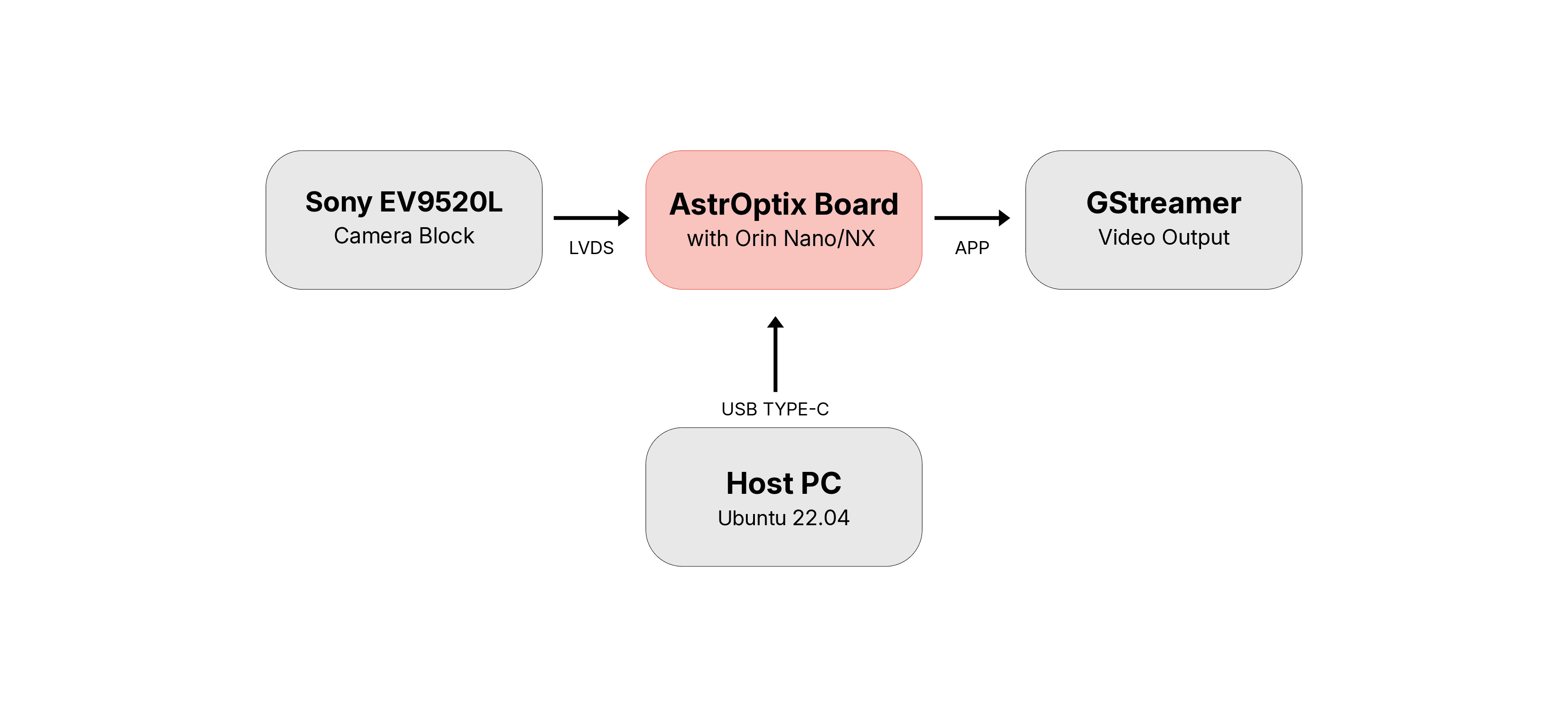
Host PC running Ubuntu 22.04 connects to the AstrOptix Board via USB Type-C for flashing.
AstrOptix Orin carrier board with Jetson Orin Nano/NX module.
LVDS Camera Block (Sony FCB-EV9520L) connected to the AstrOptix board.
Jetson exposes the camera as a V4L2 device. GStreamer reads the stream and renders the video output.
Prerequisites
Before starting, ensure the following are ready:
Required Files
Note
These files are not publicly available. Contact Oppila Support for the files.