
Image Bringup Overview
This guide covers the complete bringup process for the HDMI–MIPI CSI-2 bridge board using a pre-built L4T Oppila image. Unlike the manual driver integration workflow, this path uses a ready-to-flash image that already includes the required driver, device tree, and all configurations.
Note
The setup procedure applies to all supported HDMI cameras — Sony FCB-ER9500, FCB-ER8530, and FCB-EW9500H.
System Architecture
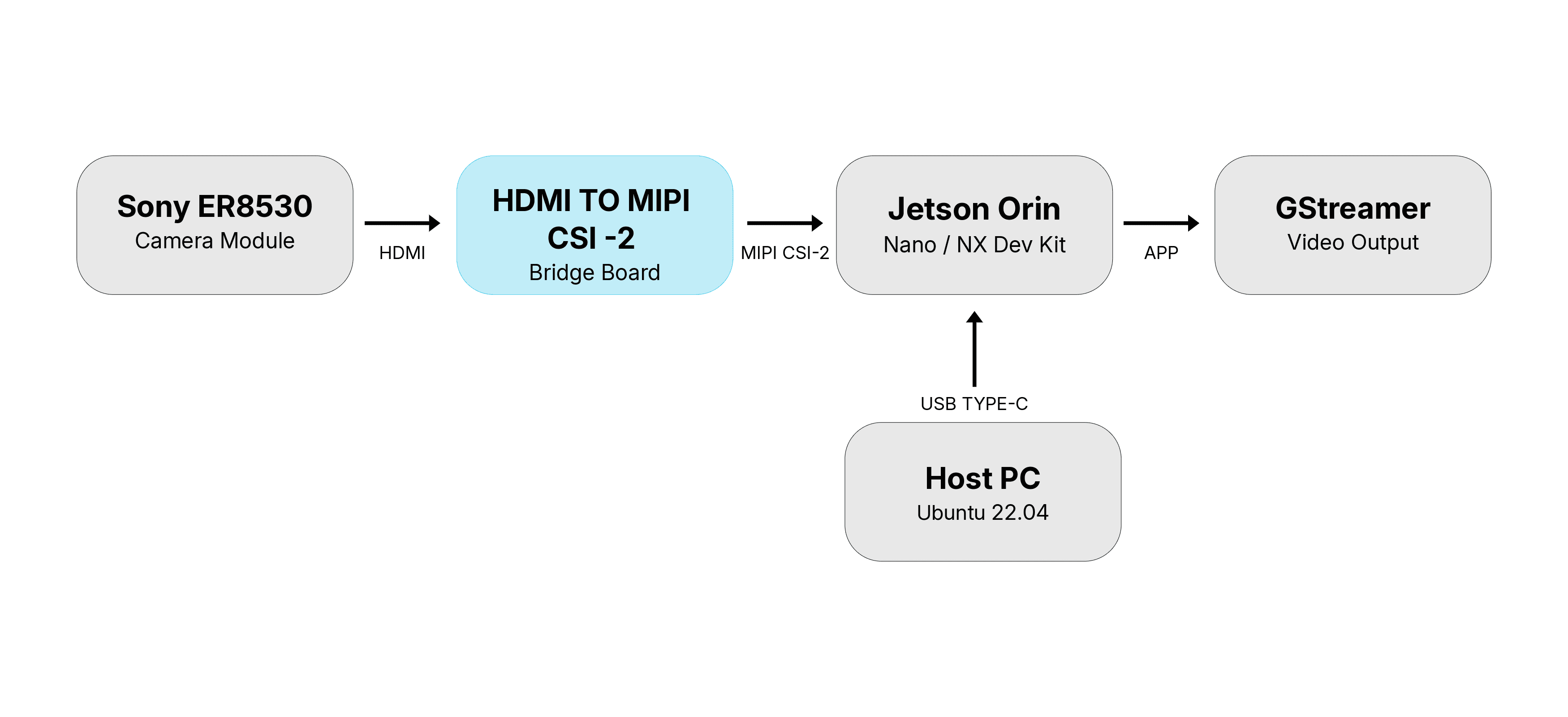
Host PC running Ubuntu 22.04 connects to the Jetson Orin Super Developer Kit via USB Type-C for flashing.
HDMI Camera Block (Sony FCB-ER8530) connected to the Bridge board.
Bridge board converts HDMI to MIPI CSI-2 and streams it to the Jetson Orin.
Jetson exposes the camera as a V4L2 device. GStreamer reads the stream and renders the video output.
Prerequisites
Before starting, ensure the following are ready:
FC_REC to GND on the carrier board before powering onRequired Files
Note
These files are not publicly available. Contact Oppila Support for the files.