Multi-Axis Robotic Arm Control using Linux, Raspberry Pi & Jetson Orin Nano over CAN Bus Communication & Custom GUI
1. Multi-Axis Robotic Arm Control using Linux (Ubuntu)
System Overview
In this setup, the robotic arm is controlled using a Linux-based computer (Ubuntu OS) through the CAN communication protocol.
The Linux system acts as the primary controller, transmitting structured CAN frames to the robotic arm for executing motion commands such as position control, speed adjustment, and predefined motion sequences.
This architecture ensures:
- Reliable CAN communication
- Real-time command execution
- Stable Linux-based driver support
- Expandability for future AI integration
Terminal-Based Control
In this mode, commands are executed directly from the Linux terminal using Python scripts or command-line utilities.
This is primarily used for:
- Initial testing
- Low-level debugging
- CAN frame validation
- Motor parameter tuning
Workflow
- User executes command in terminal
- Python script formats and sends CAN message
- Robotic arm executes motion
- Feedback printed in terminal
Custom GUI-Based Control
A custom-built Graphical User Interface (GUI) is developed on Linux to provide an intuitive control dashboard for the robotic arm.
The GUI allows:
- Manual joint angle control
- Speed control sliders
- Start / Stop motion buttons
- Predefined motion sequences
- Real-time status monitoring
Workflow
- User interacts with GUI
- GUI generates structured command
- CAN frame transmitted to robotic arm
- Motion executed
- Feedback displayed visually
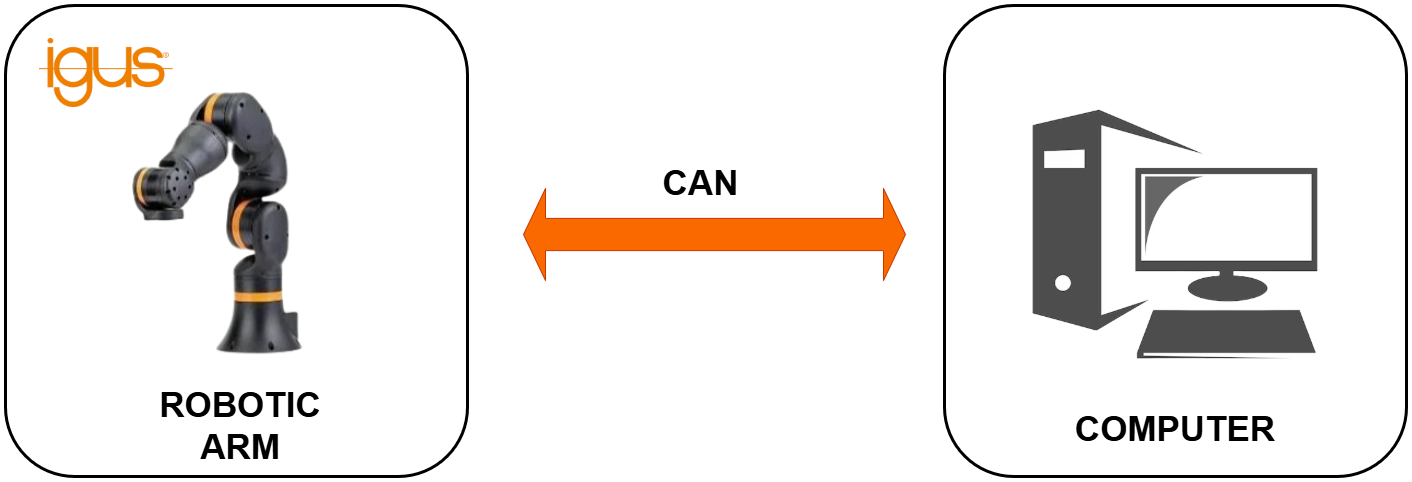
Block Diagram
System architecture showing CAN bus communication between the Ubuntu PC and the robotic arm.
YouTube Video
Watch the multi-axis robotic arm in action, controlled seamlessly from an Ubuntu Linux terminal.
2. Multi-Axis Robotic Arm Control using Raspberry Pi
System Overview
In this implementation, the robotic arm is controlled using a Raspberry Pi embedded Linux system instead of a desktop computer.
The Raspberry Pi communicates with the robotic arm through the CAN protocol, providing a compact, low-power, and portable robotic control solution suitable for field deployment and edge systems.
Terminal-Based Control (Embedded CLI Mode)
In this mode, motion commands are executed through the Raspberry Pi terminal using Python scripts.
This method is mainly used for:
- Hardware validation
- CAN communication testing
- Servo calibration
- Debugging
Workflow
- User accesses Raspberry Pi via SSH or local terminal
- Python script generates CAN frame
- CAN transmits frame
- Robotic arm executes motion
- Feedback printed in terminal
Custom GUI-Based Control (Embedded Dashboard Mode)
A lightweight GUI application is developed to provide interactive robotic arm control directly from the Raspberry Pi.
The GUI enables:
- Manual joint control
- Speed configuration
- Motion presets
- Status monitoring
- Error feedback display
Workflow
- User interacts with GUI
- GUI converts user input to motion command
- CAN message transmitted via CAN interface
- Robotic arm executes movement
- Status updated in GUI
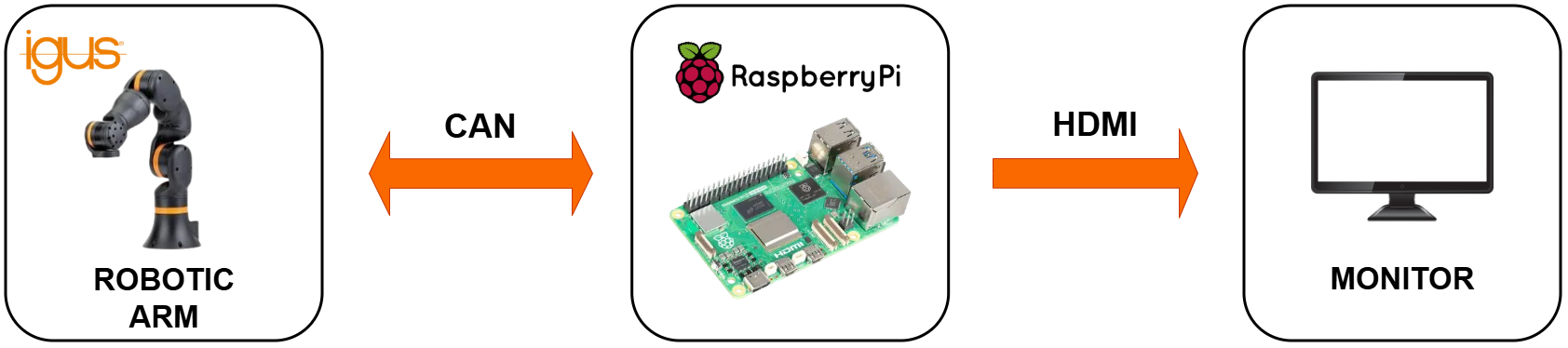
Block Diagram
Embedded control setup routing manual GUI inputs through the Raspberry Pi to the CAN interface.
YouTube Video
See the Raspberry Pi powering the robotic arm remotely via embedded control scripts.
3. Multi-Axis Robotic Arm Control using Jetson Orin Nano
System Overview
This stage upgrades the robotic control system to an AI-capable embedded computing platform - Jetson Orin Nano Super Developer Kit.
While this section focuses on motion control only (without vision), the system is designed to support high-performance AI workloads alongside robotic control.
The Jetson platform enables:
- Multi-threaded control
- High-speed CAN communication
- GPU-backed computation
- Real-time responsiveness
Terminal-Based Control (Developer Mode)
In this mode, motion commands are executed via terminal using Python scripts on Ubuntu (Jetpack OS).
Used for:
- CAN testing
- Motion debugging
- Performance profiling
- Low-level control validation
Workflow
- Developer runs control script in terminal
- CAN frame generated
- Frame transmitted via CAN interface
- Robotic arm executes command
- Feedback logged in terminal
Oppila Custom GUI-Based Control (Integrated Control Dashboard)
A custom control dashboard is developed on the Jetson platform to provide professional robotic arm control with monitoring features.
GUI capabilities include:
- Joint angle sliders
- Velocity control
- Motion presets
- Emergency stop
- Live feedback display
Because Jetson Orin NX has higher computational power, the GUI can run simultaneously with background processes such as:
- AI models
- Multi-threaded control loops
- Logging systems
Workflow
- User interacts with GUI
- Command processed in motion layer
- CAN frame generated
- Robotic arm executes movement
- Feedback displayed in real time
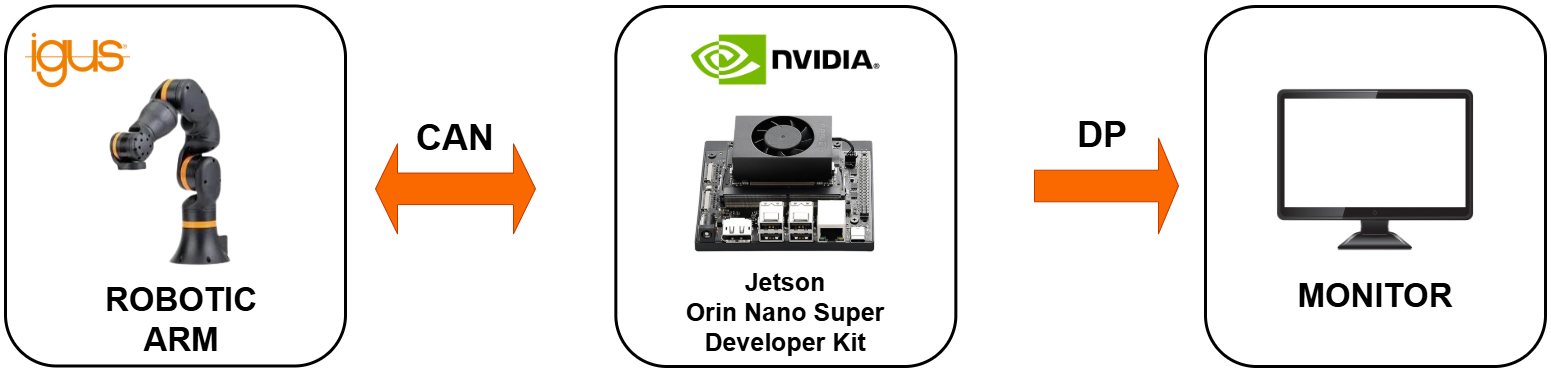
Block Diagram
High-performance control flow using the Jetson Orin Nano to manage the GUI and CAN motor commands.
YouTube Video
A live demonstration of the Jetson Orin Nano executing smooth, AI-capable motion control through its custom GUI.
Conclusion
Moving robotic controls from traditional PCs to the edge unlocks new levels of autonomy in industrial automation. Through reliable CAN bus communication and custom cross-platform GUIs, we've demonstrated how to seamlessly scale a multi-axis robotic arm from a basic Raspberry Pi controller all the way to an AI-powered Jetson Orin Nano setup.
By building intelligent, edge-deployed control systems, the future of smart, vision-guided robotics is no longer just a concept—it's ready for the field.
FAQ
You are at the right spot! Our development roadmap demonstrates how to transition from simple CAN-based motion control using a computer, progressing through embedded platforms like the Raspberry Pi, and finally moving control directly to the edge using intelligent platforms like the Jetson Orin Nano.
Yes! By escaping OEM-provided limitations and building fresh, custom GUIs on Edge AI devices, you can add an 'Intelligent Eye' to your smart industrial automation strategy. This allows machines to ultimately start, stop, and calibrate based on visual inputs from the factory environment.
Yes, terminal-based control using Python scripts or command-line utilities allows for low-level debugging, hardware validation, CAN frame testing, and precise motor parameter tuning.
The custom-built Graphical User Interface (GUI) allows operators to manually adjust joint angles, use speed control sliders, execute predefined motion presets, and view real-time status and error monitoring.
Absolutely. A Raspberry Pi embedded Linux system provides a compact, low-power, and portable solution for robotic arm control on the edge via CAN bus, ideal for field deployments.
No. You can run the robotic arm in 'Embedded CLI Mode' by accessing the Raspberry Pi headlessly via SSH to run Python scripts, making it highly portable.
It is a lightweight custom GUI application running directly on the Raspberry Pi that enables interactive manual joint control, motion presets, and status monitoring without needing a heavy desktop OS.
Upgrading to a NVIDIA Jetson Orin Nano provides an AI-capable embedded platform with multi-threaded control, GPU-backed computation, and high-speed CAN communication, preparing the arm for advanced computer vision workloads.
Yes, the Jetson Orin Nano has exceptional computational power. It can smoothly run the integrated GUI control dashboard alongside heavy background processes like AI models and multi-threaded control loops.
Python is primarily used across all three platforms (Linux PC, Raspberry Pi, Jetson Orin Nano) to format CAN messages, manage communication, and handle the logic behind the Custom GUIs.
CAN Bus is highly robust, noise-resistant, and supports real-time multi-node communication (allowing you to control multiple servo joints sequentially or simultaneously), making it an industry standard over simple serial or USB connections.
The core Python and GUI architectures are designed to be deployed across standard Linux (Ubuntu), Raspberry Pi OS, and Jetson's Linux for Tegra (L4T) Jetpack environments.
The custom GUI displays real-time feedback including live joint positions, current velocity, operation status (idle, running), and specific low-level error codes retrieved directly from the CAN bus.
Yes. By utilizing the Raspberry Pi or Jetson Orin Nano, the system performs all motion planning, CAN formatting, and GUI rendering locally at the 'Edge', minimizing the need for cloud connectivity.
Operators can use the Terminal-Based control mode on any of the platforms (PC, Pi, Jetson) to send individual, low-level CAN frames directly to a specific servo ID to validate hardware operation.
The CAN bus protocol paired with the custom GUI provides robust error handling. If a joint encounters resistance or fails to reach a position, error feedback is inherently routed back and visually displayed on the dashboard.
Yes, both the Custom GUI configurations and Python CLI scripts support 'motion presets' or programmable trajectories for automating repetitive workflows.
Yes, the control devices require a CAN bus interface—either native built-in hardware (often supplemented with a transceiver) or external modules like an SPI-to-CAN HAT or USB-to-CAN adapter.
If only basic, predefined motion is required, a Raspberry Pi is sufficient. However, the Jetson Orin Nano is an investment for developers who plan to integrate object tracking, AI inference, or vision-guided robotics in the future.
Yes. Because these platforms utilize stable CAN bus communication and robust Linux environments, they provide an excellent gateway architecture for deploying custom robotic arms in automation lines, material handling, or dynamic inspection tasks.